The Hidden Cost of Enterprise AI:
Inference, Integration, and Operations
The Hidden Cost of Enterprise AI
In November 2024, Andreessen Horowitz published Welcome to LLMflation, a historical comparison of model prices across providers. It tracked the cheapest price for a fixed level of model capability on a benchmark and found that price fell about 10x a year, or 1,000x over three years. The comparison describes past benchmark pricing across vendors. It sets no current Azure rate and predicts no future one. In September 2024, Gartner analyst Mary Mesaglio warned that AI cost miscalculations of 500 to 1,000 percent are possible, as reported by heise online. Her warning named provider price increases, ignored cloud usage costs and inefficient use among the reasons.
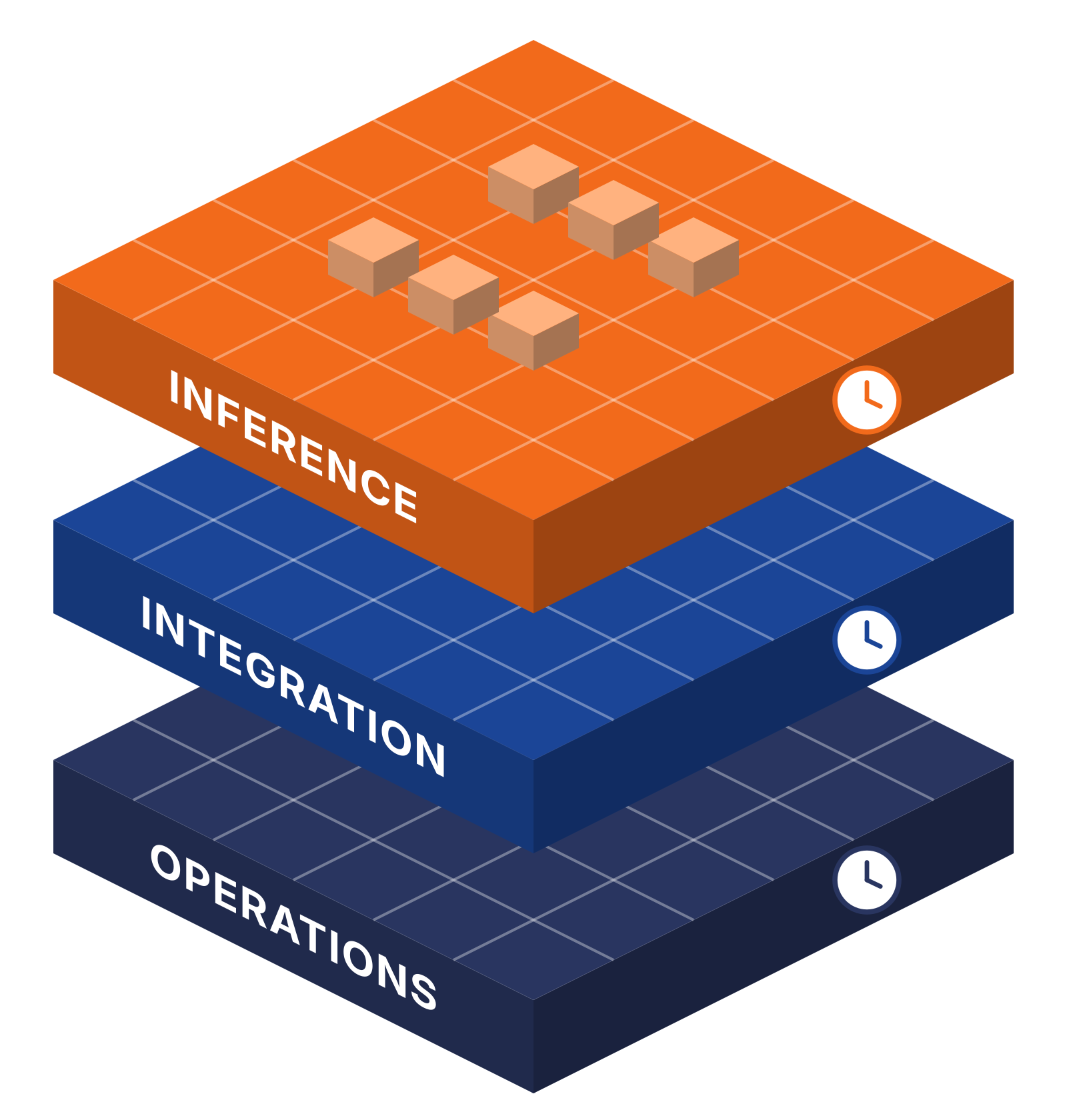
Enterprise AI cost has three layers: inference, which scales with usage; integration, which includes engineering time; and operations, which combines usage-based charges with recurring service and staffing costs.
A pilot budget usually covers the first layer. The production bill covers all three, and cost sits among the reasons why enterprise AI projects fail before the model goes live.
AI Total Cost of Ownership: The Three-Layer Cost Stack
The three-layer AI cost stack sorts every production line item by layer and by billing unit.
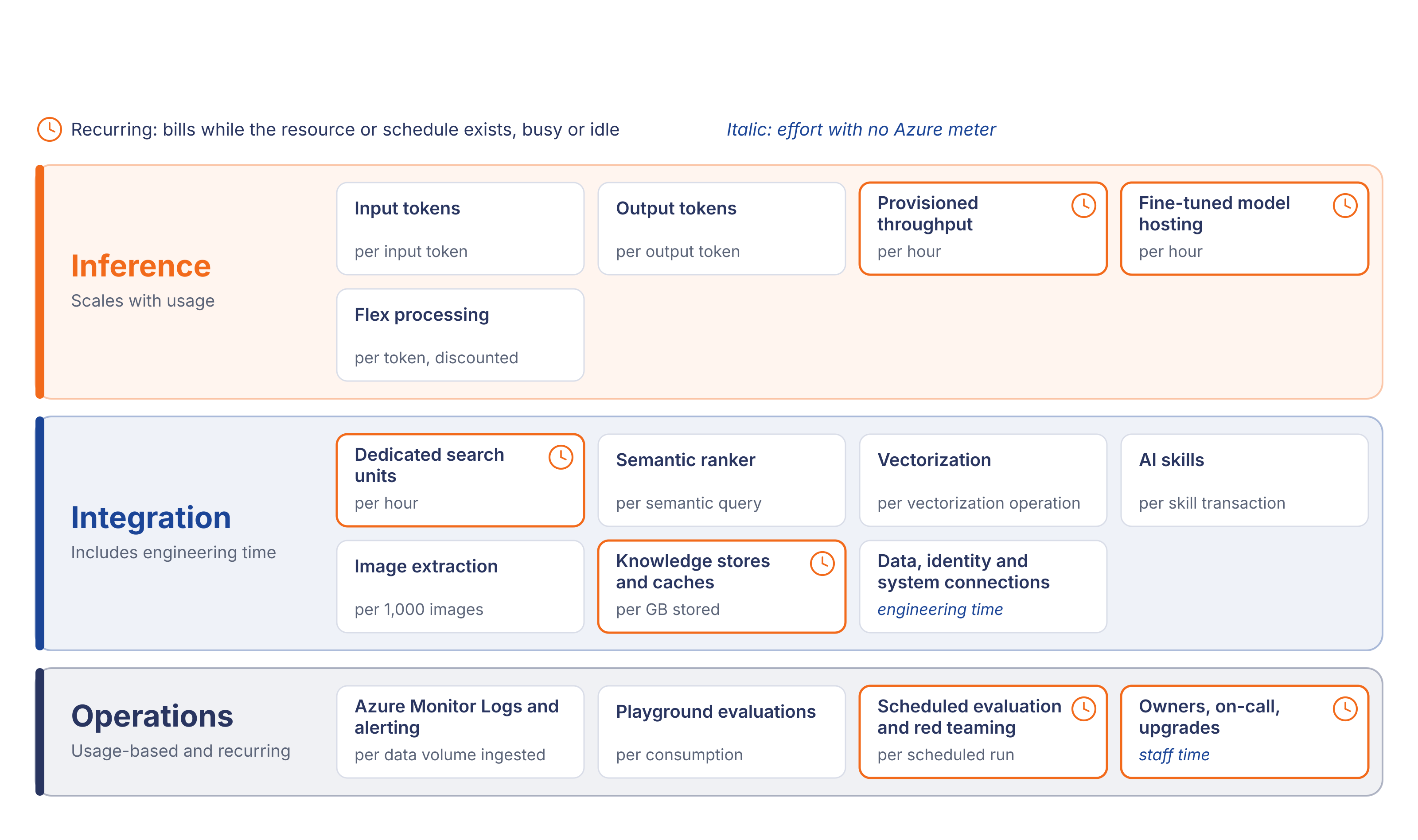
Inference is metered per input token and per output token, plus per hour for capacity that stays deployed. Integration adds search units billed per hour, semantic ranking billed per semantic query, vectorization billed per operation, AI skills billed per transaction, image extraction billed per 1,000 images and storage billed per GB, along with engineering time. Operations combines usage-based monitoring and evaluation charges with recurring scheduled runs and staff time.
The stack marks recurring items separately. Those items bill every hour the resource exists, whether the system is busy or idle, and they keep billing after a pilot ends unless someone deletes them.
This post lists billing units and leaves out rates. Azure prices change by model, region and contract, so current figures belong in the Azure pricing calculator and the Microsoft Learn pages linked in each section.
1. Inference: The Bill Everyone Sees
Azure meters input tokens and output tokens separately, and each model's input and output usage appears as its own meter under the Foundry resource. Rates differ by model and by deployment type, so the same workload carries different unit costs on pay-as-you-go and provisioned deployments.
A pilot runs on a small group of testers and a narrow set of documents. Production volume grows on four fronts at once: more users, longer prompts once retrieval adds passages to each request, retries after timeouts and errors, and agents that call the model several times to finish a single task. Agent designs that chain model calls are covered in the engineering checklist for building AI agents on Azure. Cost per completed task follows the whole chain of calls behind it.
Retrieval raises inference cost directly. Every passage added to a prompt is billed as input tokens on every call that carries it, and output length is metered on its own meter. Load tests for production therefore need realistic prompt and response lengths alongside request counts.
Some inference capacity bills by the hour. Microsoft bills provisioned throughput hourly for deployed capacity, whether or not the deployment is handling requests. A provisioned deployment cannot be paused, and billing stops only when the deployment is deleted. Azure Reservations lower the hourly rate for one-month or one-year terms and do not guarantee capacity.
Fine-tuned models add a second hourly line. Each deployed fine-tuned model carries an hourly hosting charge, and the charge applies even when nothing calls the model.
Delay-tolerant work has a cheaper path. For Azure OpenAI workloads that can wait, Flex processing provides discounted token rates and dedicated meters for cost analysis.
The a16z trend measures the per-token price of the cheapest model at a fixed capability level. A production bill applies the current unit price of the chosen model to real volume, then adds hourly capacity and the two layers below.
2. Integration: The Engineering Bill
Retrieval is usually the first service a production system adds beside the model. A dedicated Azure AI Search service runs continuously and is billed per search unit per hour, independent of query volume. Search units come from replicas and partitions, and only deleting the service stops the charge.
Premium search and enrichment features each carry a meter of their own:
- Semantic ranker: billed per semantic query, at a progressive rate.
- Vectorizers: billed per vectorization operation, at the rate of the model provider that creates the embeddings.
- Built-in and custom AI skills: billed per skill transaction.
- Image extraction: billed per 1,000 images extracted from documents.
- Knowledge stores and enrichment caches: billed as Azure Storage, per GB stored.
Each meter switches on with a configuration choice. Enabling semantic ranking on every query, vectorizing at query time or adding image extraction to an indexer pipeline changes the charge for every document and every search that passes through it. Index size drives capacity too: more documents and larger vector fields need more partitions, and partitions are search units billed by the hour.
One integration cost has no meter at all. Engineers connect the AI system to live business systems, clean and convert source data into formats retrieval can use, and enforce identity so each user retrieves only what that user is allowed to see. The same data work shows up when teams prepare Microsoft 365 data for Copilot. That time lands in project budgets and change requests, and the Azure invoice never shows it. The work also repeats after launch. A new data source, a changed permission model or a schema change in a connected system reopens the pipeline and the tests around it.
Softwarium engineers built an AI document recognition system for ProTitleUSA that classifies, extracts, validates and reports on title documents inside the company's existing workflow and handles thousands of daily uploads. The ProTitleUSA case study describes classification, extraction, validation and reporting built into that workflow, with daily upload volume handled without degradation.
In a separate project, Softwarium engineers built conversational chatbots for a cybersecurity company on Azure OpenAI Service and Azure AI Search. A pipeline converted documents, web pages, images, audio and video into embeddings, and metadata filters kept internal and external data apart.
3. Operations: The Bill That Never Stops
Monitoring comes first. Sending data to Azure Monitor Logs and alerting incur extra costs for those services. Microsoft notes that these costs appear under the other services and at the subscription level, and stay out of view when Cost Analysis is scoped to the Foundry resource alone. Azure Monitor Logs bills by the volume of data ingested, so logging full prompts and responses for every request raises the monitoring bill as traffic grows.
Evaluation adds the next set of charges. In Microsoft Foundry, playground evaluations are on by default and billed by consumption. Continuous evaluation of production traffic, scheduled evaluation runs and scheduled red teaming each add runs on a schedule, so their charges recur for as long as the schedule exists. Evaluation datasets also need upkeep: as users bring new kinds of requests, the test set grows and each scheduled run covers more cases. The test sequence those runs belong to is covered in how to test AI agents.
People are the recurring cost no Azure meter records. Each agent or model in production needs a named owner. Someone answers latency and error alerts on call. When a model version changes, the team upgrades the deployment and re-runs the evaluation suite before the new version takes traffic. Ownership also covers cost itself: someone reviews the meters each month and decides which deployments still justify their hourly charge. These hours belong in the operating budget from the first month of production.
Failed requests can still cost money. Microsoft states that HTTP status codes alone do not determine whether usage is billed. Charges depend on whether billable processing occurred for the request and on the specific meter. Error rates and retries therefore belong in the cost model as well as in the incident log.
AI Cost Management: Make Every Layer Visible
Cost visibility comes before optimization. Azure Cost Management shows all three layers once the scope and grouping match the architecture.
Group Cost Analysis by meter and by resource. Scoped to the resource group that holds the Foundry resource, grouping by meter separates the cost sources for each model series. The cost-by-resource view shows which resource generates each meter. Consistent tags on every AI resource, such as system, environment and owner, let Cost Analysis group spend by system as well as by service.
Widen the scope to dependent resources. Foundry costs are a subset of solution costs. Storage, networking, Azure AI Search and Azure Monitor bill under their own services, so the cost scope for an AI workload has to cover every resource group the system uses, or the whole subscription.
Export cost data for finance. Microsoft recommends exporting cost data to a storage account as the way to retrieve cost datasets. Finance teams then work from the same meter records as engineering.
Set budgets and alerts. Budgets track spending against thresholds, and alerts notify owners as costs approach or exceed them. Microsoft states that Azure OpenAI does not currently provide hard spending limits. Budget alerts do not stop consumption, and automated responses through action groups require additional custom development.
Three levers follow once the costs are visible:
- Delete idle fine-tuned and provisioned deployments, since both bill hourly while deployed.
- Match the search tier and number of search units to measured load.
- Route delay-tolerant work to Flex processing for discounted token rates.
When the Cost Model Needs Engineers
The cost stack doubles as a work list. Before an AI system reaches production, five items need their own scope and budget line:
- cost tagging and scope for every AI resource, so Cost Analysis can attribute spend to the system;
- integration with the legacy systems the AI reads from or writes to;
- data preparation for retrieval;
- identity enforcement across every data source;
- ongoing ownership of each model and agent deployment.
Each item takes engineering hours at any model price. Where the legacy systems run on .NET, the integration and ownership work sits with .NET engineers, and teams that need that capacity can hire .NET developers from Softwarium to join the production build.
Map your AI cost stack
Scope the engineering work behind your production AI estimate in a 30-minute call.
FAQ
Why does enterprise AI cost more in production than in the pilot?
A pilot mostly pays for tokens. Production adds retrieval services, integration with live systems, monitoring, evaluation and the people who run the system, and several of those are billed by the hour whether or not anyone uses the AI.
Does Azure charge for AI capacity when it is idle?
Some items, yes. Microsoft bills provisioned throughput hourly whether or not the deployment handles requests, charges hourly hosting for deployed fine-tuned models even when unused, and runs dedicated Azure AI Search services continuously. Pay-as-you-go token usage is billed only when used.
Can Azure OpenAI stop spending automatically when a budget limit is reached?
No. Microsoft states that Azure OpenAI does not currently provide hard spending limits. Budgets and alerts notify teams as costs approach thresholds but do not stop consumption, and automated responses through action groups require custom development.