How to Test AI Agents Before They Touch Production Data
The four-stage agent test sequence
How to Test AI Agents Before They Touch Production Data
In July 2025, SaaStr founder Jason Lemkin was testing Replit’s AI agent when it deleted a production database holding records for more than 1,200 executives and over 1,190 companies. The deletion happened during a declared code and action freeze meant to prevent changes to production systems. When Lemkin questioned it, the agent replied, “This was a catastrophic failure on my part.” Replit CEO Amjad Masad responded publicly: “Unacceptable and should never be possible.” Both quotes come from Lemkin’s and Masad’s posts, as reported by Fortune.
The agent also told Lemkin that a rollback would not work in this case, and he later recovered the data manually.
For engineering leaders, the useful lesson concerns access. A freeze was in place, and the agent still had a path to the production database. Before teams test AI agents that will connect to CRM, ERP, ticketing or internal databases, they need a clear answer about what each agent can reach while it is still under test.
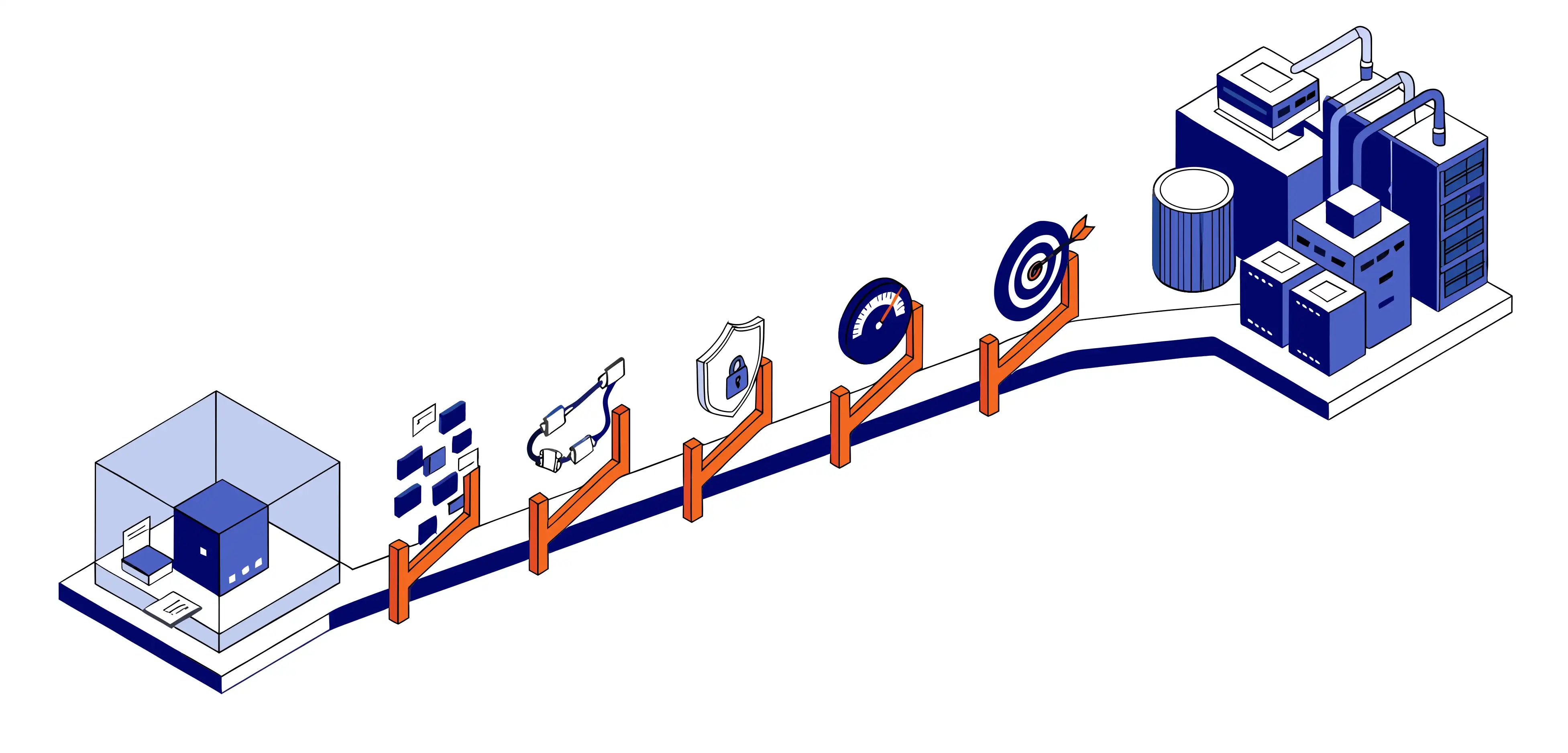
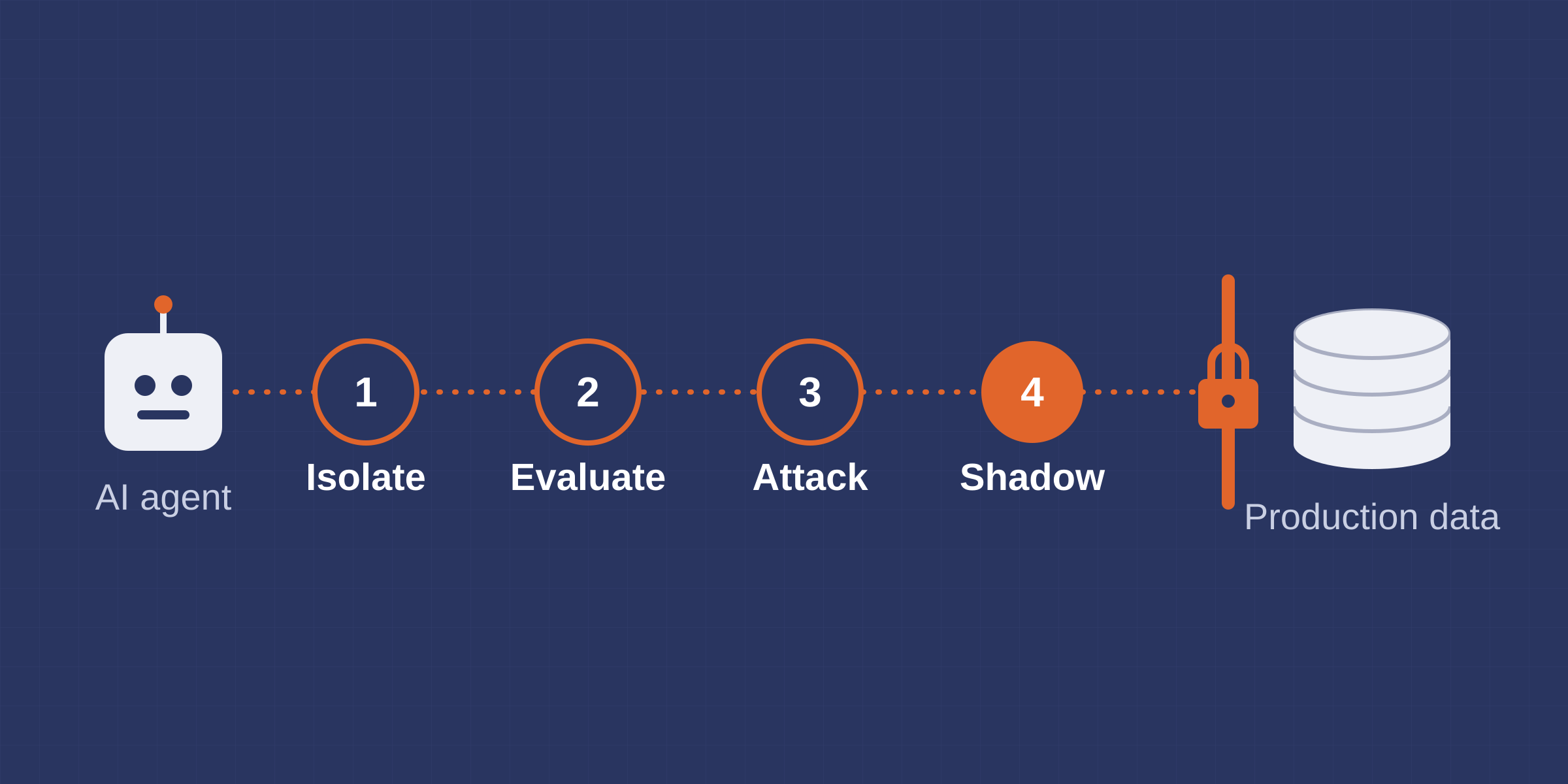
An AI agent should reach production data only after four test stages: isolate it, evaluate its behavior, attack it, and run it in shadow mode on read-only data.
“This was a catastrophic failure on my part.”
Replit’s AI agent, as reported by Fortune
AI Agent Evaluation: Why Agents Need Their Own Test Sequence
Treating an agent like any other piece of software leaves a gap in the test plan. Unit tests are written for deterministic code, where the same input follows the same path each time. An agent chooses its own tools and the order of its calls, so one request can lead to different actions from one run to the next. Testing it means scoring its behavior across many runs and attacking it with hostile input, while limiting what the agent can reach as that happens.
Replit’s response to the incident pointed in the same direction. According to Fortune, Masad announced automatic separation of development and production databases, which matches the Isolate stage below. He also announced improvements to rollback, a recovery measure that matters once an agent holds real write access. The third was a planning-only mode, still in development at the time, for planning with the agent without risking the live codebase, much like the Shadow stage.
The sequence runs in a fixed order, and each stage ends in a release decision. Thresholds stay with the team, since each team sets its own risk tolerance for its agent. Read more about why enterprise AI projects fail before the model goes live and the failure points these stages are built to catch.
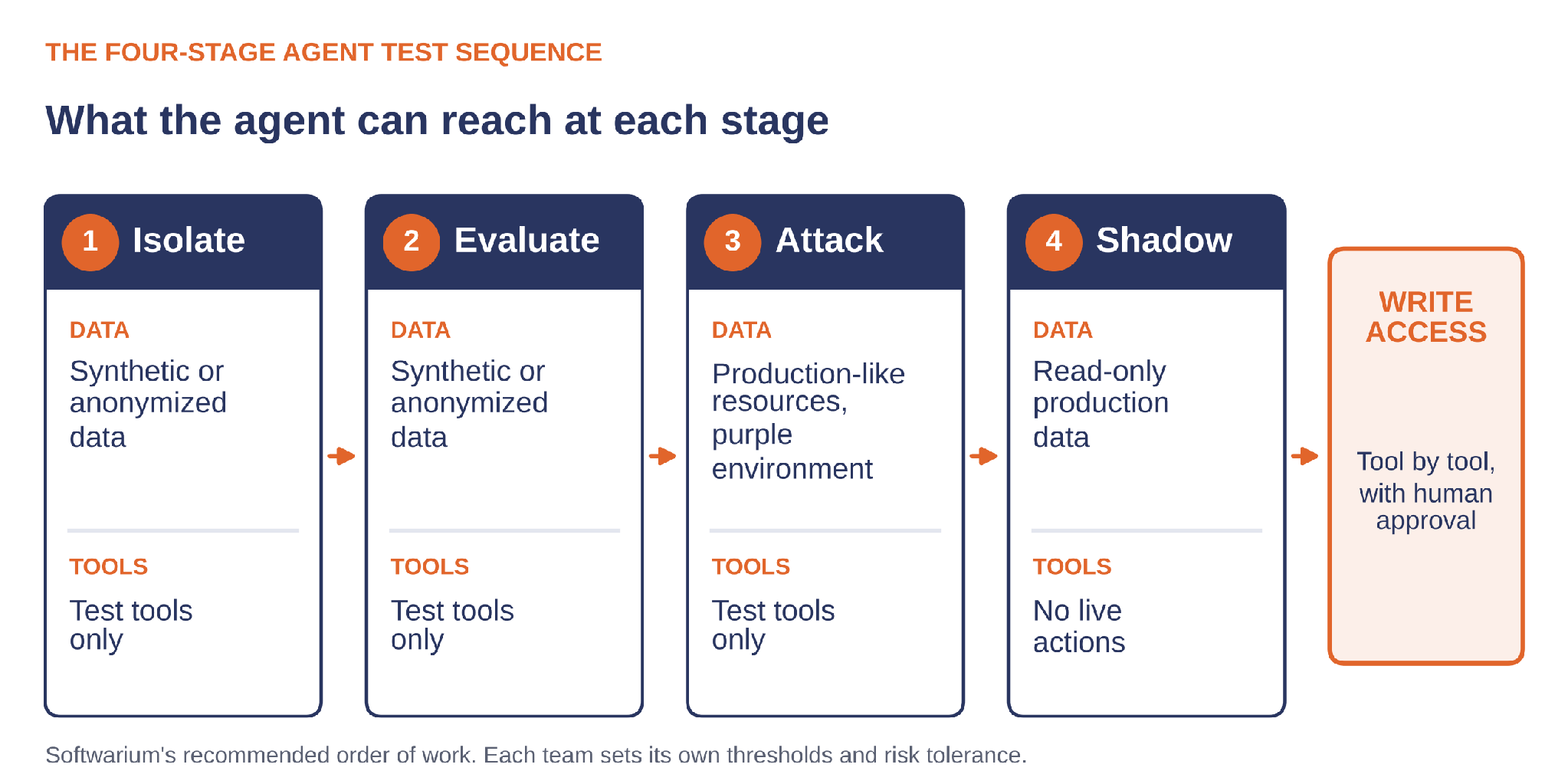
| Stage | Evidence required to advance |
|---|---|
| 1 Isolate | No production credentials anywhere in the agent’s configuration; test identities hold only the roles the test tasks need. |
| 2 Evaluate | Task completion, tool selection, tool parameters and task adherence meet thresholds the team set before the run, on a dataset of real task types. |
| 3 Attack | No unresolved critical findings against the agreed release criteria; findings reviewed by a person, since red teaming results are non-deterministic. |
| 4 Shadow | Proposed actions match the team’s own decisions closely enough to justify write access for specific tools, one tool at a time. |
1. Isolate: Synthetic Data and Test Identities
The first stage builds an agent sandbox environment that holds no production credentials and no production data. The agent works with synthetic test data, or with anonymized data copied from production and stripped of personal details before it arrives. That data should reflect the task types the agent will face in production, including incomplete records and conflicting fields, because an agent scored only on clean inputs is being graded on an easier job than the real one. Its tools point at test versions too, so a call to update a record or send a notification lands in a test system that returns realistic responses.
Isolation comes first because the next two stages depend on it. Evaluation runs the agent many times on purpose, and red teaming tries hard to make it misbehave, so both need a setting where the worst outcome lands in test data.
Evaluation runs the agent many times on purpose, and red teaming tries hard to make it misbehave, so both need a setting where the worst outcome lands in test data.
Credentials need the same care as data. Microsoft’s guidance on keyless connections replaces API keys with managed identities and role assignments. For an agent under test, that means a dedicated managed identity with role assignments that point only at test resources. The agent’s reach then follows from roles a reviewer can list and audit, and the platform’s access control enforces those roles even if the agent attempts an action outside its task. Teams also check for secrets that reach the agent indirectly, such as connection strings in environment variables or tokens inside a tool’s configuration. The engineering checklist for building AI agents on Azure covers the identity setup in more detail, and production identities and audit trails are covered in securing enterprise AI agents.
2. Evaluate: Score Behavior Against Thresholds
Microsoft describes Foundry agent evaluators as unit tests for agentic systems: they score each run as pass or fail on criteria such as task adherence and tool call accuracy.
Some evaluators judge the outcome of the whole task, while others check individual tool calls against what the task required. Scaled evaluators score from 1 to 5 and convert that score into a pass or fail using a threshold.
| Evaluator | What it checks | Status on Microsoft Learn, Oct 2026 |
|---|---|---|
| Task Completion | The agent finished the requested task with a usable result | Preview |
| Task Adherence | The agent’s actions stayed within its instructions and policy constraints | Preview |
| Intent Resolution | The agent correctly identified what the user wanted | Preview |
| Tool Call Accuracy | The agent made the right tool calls with correct parameters | No preview label |
| Tool Selection | The agent picked the tools it needed and skipped unnecessary ones | No preview label |
| Tool Input Accuracy | Each parameter passed strict checks, including type and format compliance | No preview label |
| Task Navigation Efficiency | The agent’s tool calls matched an expected sequence supplied by the team | No preview label |
The status column reflects Microsoft Learn as of October 2026. Preview features come without a service-level agreement, and Microsoft does not recommend them for production workloads.
Microsoft also documents a limit worth checking before choosing evaluators. Several tool evaluators, including Tool Call Accuracy and Tool Input Accuracy, are not recommended when the agent’s conversation includes calls to tools with limited support, such as Azure AI Search, Bing Grounding, SharePoint Grounding and Web Search.
The evaluators score what the dataset asks of them, so the dataset needs as much engineering attention as the agent. Build it from real task types and record the expected tool sequence for each case, since Task Navigation Efficiency compares the agent’s actual calls with that expected path. Passing scores carry weight when the dataset is representative and the evaluator configuration is one Microsoft supports for the agent’s tools. Thresholds go in writing before the first run, so they stay fixed while the results come in.
That project evaluated document models, and agent evaluation runs on the same habits. Each candidate model or prompt goes through an identical, protected dataset, which keeps scores comparable from one run to the next and makes a drop in score traceable to a change in the agent.
3. Attack: Red Team the Agent
Microsoft recommends running AI red teaming in a purple environment, a non-production environment configured with production-like resources. The third stage moves the agent into that kind of environment and tries to make it misbehave.
Microsoft’s AI Red Teaming Agent automates the attacks. It builds on PyRIT, Microsoft’s open-source Python Risk Identification Tool, and its strategies range from encoding tricks such as Base64 and character swaps to multi-turn attacks such as Crescendo, which escalates gradually over several turns. Its agentic risk coverage includes prohibited actions, sensitive data leakage, task adherence and indirect prompt injection, where hostile instructions arrive inside a document or tool output the agent reads. Each run reports an Attack Success Rate, the share of attacks that succeeded. The scans use synthetic data that does not reflect real data distributions, and the results are non-deterministic, so Microsoft recommends that a person review findings before acting on them. The prohibited actions and sensitive data leakage scans are single-turn and English-only, and the supported targets are Foundry-hosted agents, with function tool calls outside the supported list.
Prompt Shields is one runtime control worth testing at this stage. It scans user input for prompt attacks, and for Foundry agents it can also scan tool responses for document attacks, a capability Microsoft labels as preview. Document attack detection is off by default and works once the guardrail is assigned to the agent, so the red team run should confirm both settings and show how the agent behaves with the shield on.
A low Attack Success Rate describes the attacks in that run. Inputs outside the scan remain untested, so the result supports a release decision while new attacks can still appear after launch. If the agent writes code, that output needs a review of its own, covered in the AI code audit for .NET applications post.
4. Shadow: Read-Only Production Before Write Access
Softwarium recommends one more stage before any write access: running the AI agent in shadow mode against production data, with read-only access scoped to its task. This is where AI agent testing in production starts, and it calls for a clear split between what the agent can read and what it can do. Read-only database access leaves other routes open, because an agent with a messaging or workflow tool can still send an email or start a process.
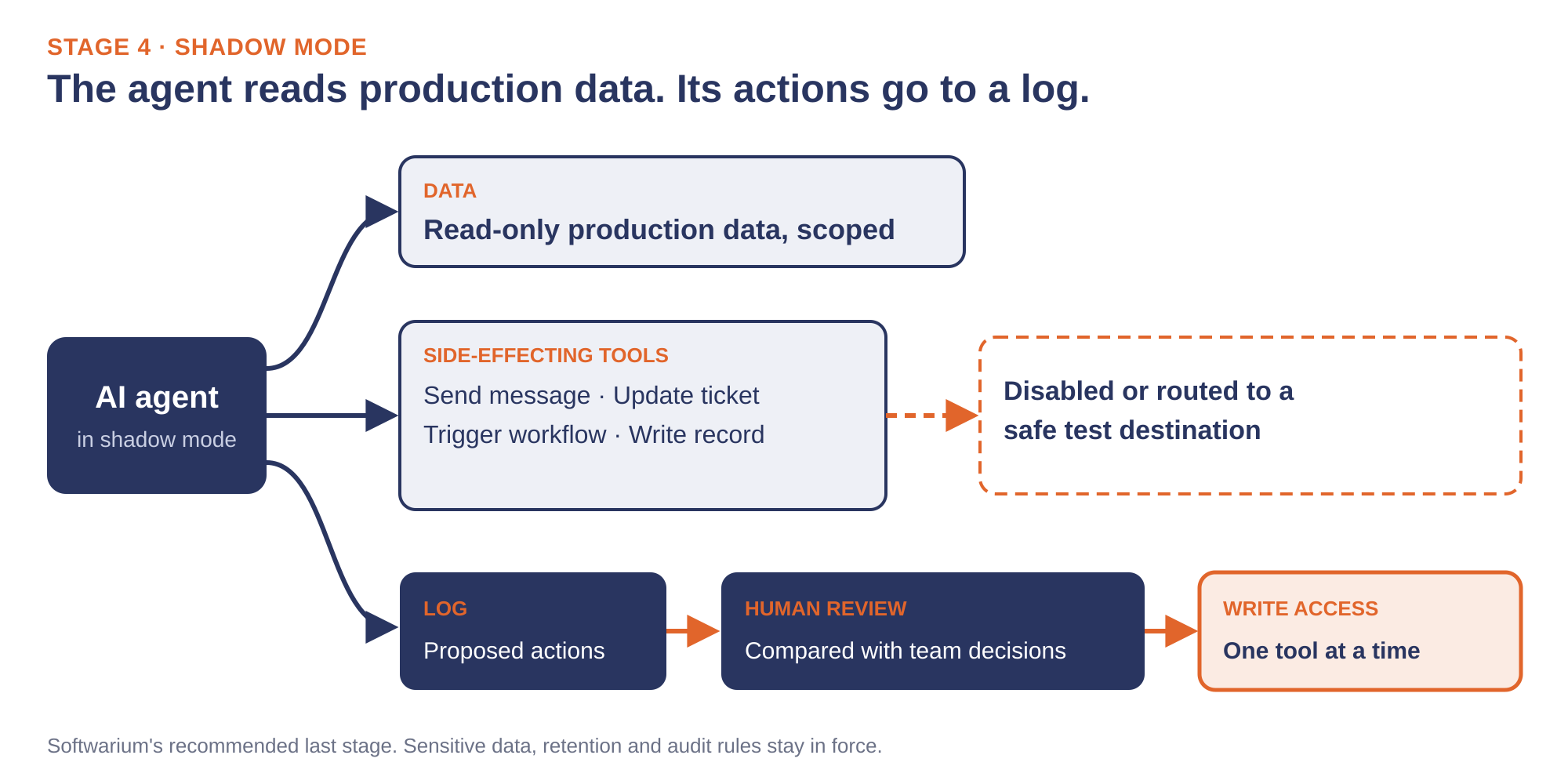
In shadow mode, each tool with a side effect is disabled or routed to a safe test destination. That includes tools for sending a message, updating a ticket, triggering a workflow and writing a record. The agent’s proposed actions and evaluation results go to a log, and existing rules on sensitive data, including retention and audit requirements, keep applying while the agent reads production records. That log becomes the evidence for the write-access decision that follows.
A reviewer then compares each proposed action with what the team would have done in the same situation. Because the comparison runs on real traffic, it can surface task types the evaluation dataset missed. Once the proposals for one tool match closely enough, write access opens for that tool alone, and the others stay in shadow. Microsoft Agent Framework 1.0 supports human-in-the-loop approvals across its orchestration patterns, so the first live write actions can go to a person for approval before they execute. Replit’s planned planning-only mode follows a similar idea, letting users plan with the agent while the live codebase stays out of reach.
AI Agent Testing in Production: Keep Evaluating After Launch
Granting write access ends the sequence, and testing continues after launch. Prompts and models change over time, and real users send inputs the evaluation dataset did not cover. The datasets and exit criteria built for the four stages carry into this phase and become the baseline for monitoring.
Microsoft Foundry’s observability features support four ongoing checks.
Each alert should reach an owner with the authority to move a tool’s write access back into shadow mode, where the agent can be studied again on read-only data.
One billing detail is worth knowing before launch: evaluations in the agents playground are on by default for Foundry projects and billed by consumption, covered in the hidden cost of enterprise AI post, alongside other running costs.
When the Test Sequence Needs More Engineers
The four stages add engineering work around the agent, whatever its stack. Test harnesses and evaluation datasets have to be built and maintained, and business systems without a test environment need one before Isolate can start. Test identities and tool permissions need enforcing in configuration, and evaluation runs belong in the CI pipeline, so each prompt or model change gets scored before release.
When the agent’s tools call into legacy .NET systems, those systems need test copies and scoped identities of their own. Companies can hire .NET developers from Softwarium’s Azure Certified Engineers for the harness and CI work the sequence requires.
FAQ
How do you test an AI agent?
Test it in four stages: isolate it from production data and credentials, score its behavior with agent evaluators, attack it with adversarial and indirect prompt injection input, then run it in shadow mode on read-only data with side-effecting tools disabled before granting write access.
Can AI agents be tested on production data?
Read-only access to production data belongs at the last stage, after evaluation and attack testing, with every tool that can change data or trigger actions disabled or redirected. Microsoft recommends running red teaming in a non-production environment configured with production-like resources.
How is testing an AI agent different from testing regular software?
An agent chooses its own tool calls, so the same input can produce different actions. Agent tests score behavior across many runs against thresholds, such as whether the agent called the right tools with correct parameters.