From Enterprise Data Silos to AI-Ready Data: An Architecture Roadmap

From Data Silos to AI-Ready Data
In February 2025, Gartner published two findings on data readiness for AI: a survey result on data management practices and a prediction for a period that closes this year.
63%
of organizations lack, or are unsure they have, the right data management practices for AI
Gartner survey, February 2025
60%
"…through 2026, organizations will abandon 60% of AI projects unsupported by AI-ready data."
Gartner prediction, February 2025
Gartner framed the 60% figure as a prediction, and it covers AI projects that proceed without AI-ready data. Missing or unprepared data is one of the failure points in Softwarium's analysis of why enterprise AI projects fail before the model goes live.
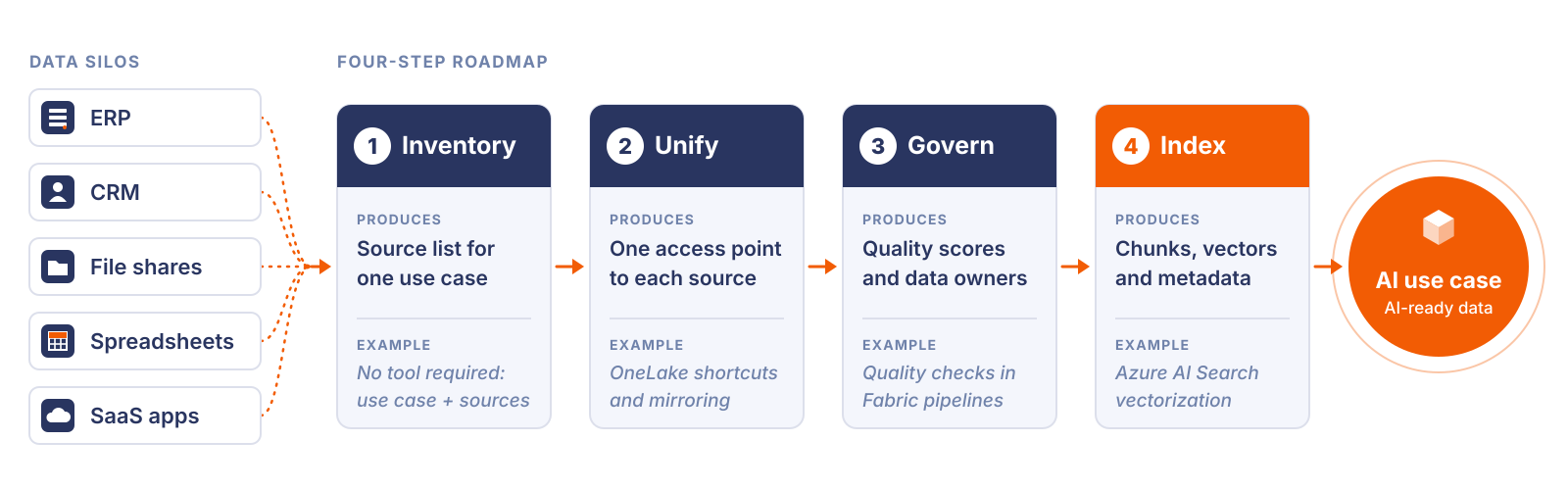
An architecture roadmap from data silos to AI-ready data has four steps: inventory the data one use case needs, unify access to it, govern its quality, and index it for retrieval. The roadmap pairs each step with a Microsoft-stack example and states that component's documented limits beside it. It begins with a single use case, so a team can start preparing AI-ready data without waiting for a full platform migration.
Data Silos and AI: Why Readiness Starts With One Use Case
Gartner's definition of AI-ready data starts from the use case. Data is ready when it represents what a specific AI model has to learn or act on, including the errors and outliers that real operations produce. Gartner treats readiness as an ongoing practice that relies on metadata to align the data with its use case, and then to qualify and govern it.
Gartner ties AI-ready data to a specific use case and states that there is no way to make data AI-ready in general or in advance. Data that scores well against traditional quality standards can still fall short for a model, because an algorithm needs data that represents the use case, flaws included.
Silos create a particular problem for AI. To answer a customer's question about an order, a model needs the order record from the ERP and the account history from the CRM in one response. Identifiers have to match across both systems before the model can link those records, and each source's access rules have to travel with the data so answers reach the right people.
The same definition answers teams who expect a full data platform migration to come first. Readiness is defined per use case, so the work can begin with one: connect the sources it needs where they already live, then govern and index that data before moving on.
AI Data Architecture: The Four-Step Roadmap
The four steps run in sequence, since each one produces the input for the next. The inventory tells the team which sources to connect, and the Govern step scores data that the Unify step has already made reachable. Indexing comes last, once the data has passed its quality rules. The roadmap names a Microsoft-stack component for each step as an example, and the order of work carries over to other tools.
1. Inventory: Map the Data One Use Case Needs
The inventory opens with one sentence that names the use case and the people who will rely on it. A data inventory for AI use cases then lists each source that use case touches and records four facts about it: the owner, the format, how often the data has to refresh and who may read it. The owner matters because quality rules and access decisions need a named person on the source side, and the refresh need shows which sources can be read on a schedule and which have to stay close to real time.
Format covers two separate questions. The first is the type of content, because structured tables move through different pipelines than documents and images, which go through chunking and embedding in the Index step. The second is the storage format, which decides the Unify method. Microsoft's OneLake documentation separates open formats, such as Delta and Iceberg tables, from the proprietary formats of databases like SQL Server and Oracle, and it connects each group differently.
Sensitive data gets marked during the inventory as well. The list records which fields hold personal or confidential information and which groups may see them, so the access rules can follow the data into the index. For content stored in Microsoft 365, permissions on SharePoint sites and Teams files form a separate workstream, covered in the guide on how to prepare Microsoft 365 data for Copilot.
The finished inventory sets the scope for the rest of the roadmap, and the sources on that list are the ones that move on to the Unify step.
2. Unify: Connect Sources Where They Live
Microsoft OneLake can unify data without storing all of it in one place: shortcuts read open-format data where it lives, and mirroring replicates databases kept in proprietary formats. The method varies by source, and some methods copy data into OneLake while others leave it at the source.
A shortcut adds a reference to selected folders or tables without copying them. Mirroring adds a whole database or catalog to Fabric, and the source decides what happens next: proprietary-format databases are replicated into OneLake as Delta tables and kept in sync, while open catalogs are read in place. Microsoft's documentation names mirroring as the only option for proprietary-format data, and two sources on its list carry preview labels.
| Method | Sources Microsoft lists | What happens to the data |
|---|---|---|
| Shortcut | Delta and Iceberg data in Azure Data Lake Storage, Amazon S3, Google Cloud Storage, Dataverse | Read in place, no copy |
| Mirroring, replicated | Azure SQL Database, SQL Server, Azure Cosmos DB, Azure Database for PostgreSQL, Oracle, SAP; Azure Database for MySQL (preview) | Replicated as Delta tables, kept in sync |
| Mirroring, read in place | Azure Databricks, Snowflake; Dremio (preview) | Read in place through shortcuts |
| Pipelines or copy jobs | Other sources, or data that needs joins and business rules | Moved and transformed on the team's own schedule |
Shortcuts to mirrored tables are read-only, so changes to the data happen in the source system and mirroring carries them into OneLake. These shortcuts also inherit the mirrored item's permissions, and a paused or failed replication shows up in each shortcut that points to it. A shortcut to replicated data adds no second copy and no extra storage cost.
SOFTWARIUM DELIVERY · SYNOVOS · POWER BI EMBEDDED REPORTS
Synovos, an MRO supply chain company, ran part of its reporting on Excel files large enough to strain regular computers, and those files moved between teams as email attachments. Softwarium engineers replaced Synovos's practice of emailing Excel reports of around 300 MB with Power BI Embedded reports published to Power BI Service. Synovos staff open the reports and custom dashboards in one shared place, and Softwarium continues to provide ongoing development.
SOFTWARIUM DELIVERY · SYNOVOS · CUSTOMER INVENTORY DASHBOARD
In a separate project, Softwarium converted Synovos's inventory data from a multi-tab Excel spreadsheet into a Power BI dashboard that customers open from the e-catalogue, with the same data shown in Synovos's CRM. Customers see available inventory and open orders, and the case study states that the information updates in real time.
Both projects gave people one access point for data that had previously lived in Excel files.
3. Govern: Score Quality Before a Model Reads It
Gartner's definition separates a high data quality score from AI readiness, so data quality for AI starts from the use case. In practice, the rules become four questions:
01 · COMPLETENESS
Does each record carry the fields the use case needs?
02 · CONSISTENCY
Do identifiers match across the systems the use case draws on?
03 · FRESHNESS
Is the data current enough for the decisions the use case supports?
04 · ACCESS
Can the intended users access it?
The first three questions translate into rules that run against the data on a schedule. Access is a permissions matter, and inside Microsoft 365 it belongs to the work described in the Copilot data readiness guide.
Each rule needs a pass-or-fail check for each record, a threshold for the share of records that must pass, and a named owner on the source side who receives the alert when the score drops. A consistency rule, for example, checks that one customer ID resolves to one account in the ERP and the CRM. A freshness rule sets how old the newest record may be, and it works as an SLA between the source team and the team that runs the model.
On the Microsoft stack, the tool for this step changed in November 2026. Microsoft is retiring Microsoft Purview Unified Catalog, which holds Purview's data quality rules and scores: new accounts can no longer be created, and existing capabilities stay in maintenance mode through November 12, 2027, while data governance consolidates in Microsoft Fabric. A team starting now can run its rules as validation steps in the Fabric pipelines or notebooks that already load the data and write the results to a table that dashboards and alerts read. Rules kept in code stay with the data when the governance tool changes.
In Gartner's terms, the Inventory step aligns the data with its use case, and the Govern step qualifies and governs it.
4. Index: Prepare Data for Retrieval
A vector index for RAG (retrieval-augmented generation) lets a model find passages by meaning, and its metadata controls which passages each user can retrieve. Building one follows a set order:
- Split source content into chunks with the Text Split skill or a document parsing mode, so each chunk fits the embedding model's input limit.
- Generate an embedding for each chunk with an embedding model.
- Store each chunk's text and metadata in the search index beside its vector.
- Configure retrieval and metadata filtering for the use case, for example filters that keep internal content out of customer-facing answers.
- Match the query-time vectorizer to the embedding model used to encode the content, so query vectors and indexed vectors stay comparable.
Azure AI Search integrated vectorization handles steps 1, 2 and 5 inside the indexing pipeline. Its embedding skills call Azure OpenAI models, models from the Microsoft Foundry model catalog or a custom endpoint, and the multimodal embeddings skill for images is in preview. Search capacity and embedding calls both add to running costs, which the post on the hidden cost of enterprise AI examines. For agents, the engineering checklist for building AI agents on Azure covers grounding in more depth.
SOFTWARIUM DELIVERY · CYBERSECURITY SOFTWARE COMPANY · RAG CHATBOTS
Softwarium engineers built a retrieval pipeline of this kind for a cybersecurity software company that needed two chatbots, one for customers and one for internal staff. The pipeline turned PDFs, Word files, web pages, images, audio and video into embeddings, and Azure AI Search combined vector and keyword search over them. Metadata tags and filters kept the internal dataset apart from the external one, which let the internal chatbot work with sensitive documents and kept the customer chatbot on external content.
SOFTWARIUM DELIVERY · PROTITLEUSA · DOCUMENT RECOGNITION
Document extraction prepares data for retrieval by a different route. For ProTitleUSA, a title search company that handles thousands of title documents a day, Softwarium built a recognition system on Google Cloud that classifies incoming documents and extracts fields such as parcel numbers and lien indicators. The system validates those fields against business rules within ProTitleUSA's existing workflow, and analysts confirm each field next to its highlighted source text. Structured fields like these can be filtered by exact value, which a scanned page does not allow.
When the Roadmap Needs Engineers
Each step becomes engineering work once the inventory is set. Legacy systems outside the shortcut and mirroring lists need source connectors or pipelines, and the use case needs a data model that reconciles identifiers across systems. Quality rules have to be written for the use case and tuned against real data, and embedding pipelines need building and monitoring. Access rules must follow the data from each source into the index.
On the Microsoft stack, much of this is .NET and Azure work, from APIs that connect line-of-business systems to indexing pipelines built with the Azure SDK for .NET. Softwarium provides dedicated development teams and individual engineers for that work, and engineering leaders who need to hire .NET developers can add them to an existing data or platform team.
Start with one use case
To map the first use case and the sources behind it, talk to Anna Moskalets, Head of Digital Enhancement.
FAQ
What is AI-ready data?
Gartner describes AI-ready data as data that is representative of a specific AI use case, shown through metadata that aligns, qualifies and governs it. Gartner states there is no way to make data AI-ready in general or in advance.
Do you need a data lake before starting an AI project?
Not necessarily. Microsoft OneLake can unify access without moving all data into one place: shortcuts read open-format data where it lives, and mirroring replicates databases stored in proprietary formats.
How do you prepare documents for AI retrieval?
Split documents into chunks, generate embeddings with an embedding model, and store them in a search index with metadata for filtering. In Azure AI Search, the query-time vectorizer must match the embedding model used to encode the content.